How to add a link to an Instagram story from your PC
To add a link to an Instagram story from a PC, you have two real routes: Meta Business Suite, if your account is professional and connected to a Facebook Page, or a Chrome extension such as InstaDesk or INSSIST, which runs inside your browser. If your phone is nearby, Instagram's own link sticker in the app does the job, and any account can use it.
Which way should you add a story link from a PC?
| Method | Who it suits | Watch out for |
|---|---|---|
| Instagram's phone app | Anyone with their phone to hand | It isn't from your PC |
| Meta Business Suite | Business or creator accounts connected to a Facebook Page | No personal accounts; guides disagree on how full its link sticker support is |
| InstaDesk (Chrome extension) | People who want to stay on instagram.com in their browser, with any account they're logged in to | Limited free tries on new installs, then Pro |
| INSSIST (Chrome extension) | People who want another extension, with stickers and music | Its guide marks links as premium, so check its plan |
How do I add a link to a story with Meta Business Suite?
Meta says Business Suite lets you create and schedule stories on desktop. It doesn't take personal accounts, and your Instagram must be connected to a Facebook Page. These steps come from Hopper's July 2026 guide:
- Go to business.facebook.com and choose your business account.
- Choose Create story and tick Instagram under the platforms.
- Upload a tall 9:16 photo or video.
- Add the link sticker if the editor offers it, then publish or schedule.
Be ready for step 4 to differ on your account. Metricool's June 2026 guide says you can add link stickers there, while Storrito calls link sticker support limited. We couldn't find a page from Meta that gives the desktop steps, so look for the sticker before you build a story around it.
How do I add a link to a story with InstaDesk?
InstaDesk adds a Create panel to instagram.com in Chrome. It uses the login already in your browser, so there's no Facebook Page to connect and no password to enter. This video shows it, and the steps are underneath.

- Add the extension to Chrome and open instagram.com. Refresh if the tab was already open.
- Click the InstaDesk launcher and choose Post a story with a link. If your menu is the longer one, it's Link sticker on story.
- Drag in a photo or a video of up to 60 seconds, or press Choose from computer.
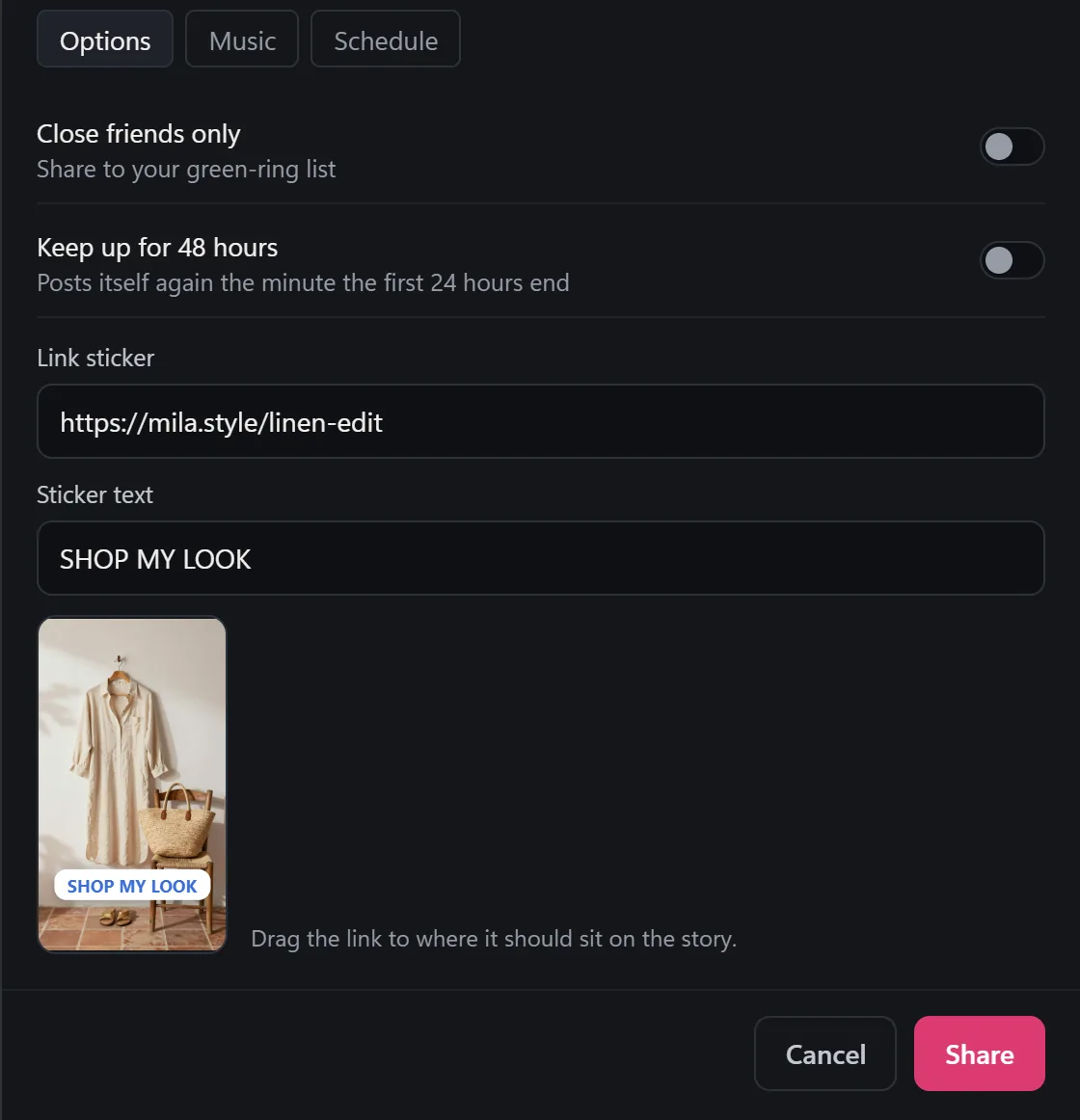
- Under Options, paste your address into Link sticker.
- Type your own words in Sticker text, up to 30 characters.
- Drag the sticker to where it should sit on the story.
- Press Share, then open the story on your phone and tap the link to check it.
On a video, the sticker is drawn into the video, so posting takes a little longer. If you add several frames as a story set, each one can have its own link. You can also send it later from the Schedule tab, as long as Instagram is open in a tab at that time.
How do I add a link sticker on my phone?
This is Instagram's own way, and Planoly's guide has the same steps:
- Start a new story and add your photo or video.
- Tap the sticker icon and choose Link.
- Enter the address and tap Done.
- Move the sticker where you want it, then share to your story.
What are the limits?
- New installs of InstaDesk 4.0.5 and later get 3 free link stories, then it's part of Pro. The pricing section has the details. A story with no link doesn't use a try.
- InstaDesk runs on a computer only. It doesn't run on phones.
- Instagram can change how stories work at any time, and that can stop any third-party tool working until it's fixed. We can't promise anything about how Instagram treats an account.
- Link stickers can't guarantee clicks. Whether people tap is up to your story.
Common questions
Do I need 10,000 followers to add a link to a story?
No. Link stickers are available to all accounts, whatever their follower count.
Do I need a business account?
Only for Meta Business Suite. Instagram's phone app and InstaDesk don't need one.
Can I put a link on a video story from my computer?
Yes, in InstaDesk. Use a video of up to 60 seconds. The sticker is drawn into the video, and you can still tap it.
Does InstaDesk need my Instagram password?
No. It works through the login already in your browser and never asks for your password.